Scientific calculator plus 9917.6.5.7
Publisher Description


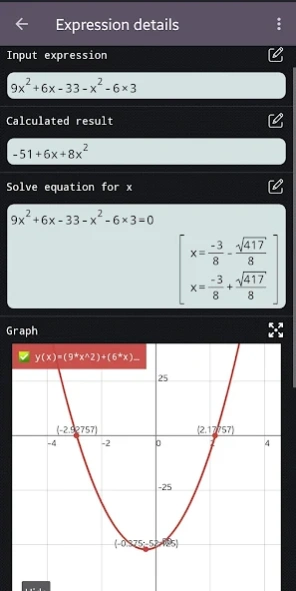
Advanced scientific calculator 991 plus. Includes simulator 115 and 300 plus.
Scientific calculator 300 plus, 991 is the calculator for students and engineering student. Calculator 991 plus provides powerful functions in a real calculator 991 300 . It makes advanced calculator 991 become the most useful calculator for university and school.
Application includes some calculators inside:
- Basic calculator 300 plus
- Advanced calculator 115 plus
- Scientific calculator 991
- Scientific calculator 991 plus
- Graphing calculator 84 plus
Let's see some special features:
◉ Basic calculator 300 plus and 115 plus: supports from basic mathematics to advanced math functions: percentage, powers, roots, trigonometric, logarithms calculator. Fraction calculation 991 supports convert fraction to decimal, mixed fraction and solve fractions problems.
◉ Advanced calculator 115 plus: combines of hyper calculator and simple scientific calc. This calculator is a multi-functional advanced calculator 991 with all features in one app. Such as linear algebra, calculus, complex numbers, display result in rectangular and polar coordinates, matrix and vector.
◉ Scientific calculator 991 plus: includes smart equation solver. Equation solver can solve quadratic, cubic equations, systems of equations. Caluculator solves any polynomial. Smart scientific calculator 991 has exponent calculator contains scientific calculations such as derivative, integral, square root calculation, factorial calculation, pi calculation, equation solver.
◉ Scientific calculator 991: supports calculate with infinity number of digits, prime factors, random numbers, combinations, permutations, GCD and LCM. This calculator 991ex is a real engineering simulator. Scientific calculator has features of 500 es, 500 ms, 300 es plus, 991 es plus. Calculator keyboard layout same as calculator 300 es plus, 991 ex and es plus.
◉ Graphing calculator 84 plus supports function graph, polar, parametric and implicit function. Graphing calculator 84 can draw tangent, tracing, derivative, root, min and max. It simulates for graphing caluculator 83 and t1 84, 84 plus.
◉ Integral calculator 991 plus provide powerful calculator to calculate integrate, derivative, differentiation and integration.
◉ This scientific calculator 991 includes CAS (computer algebra system), which can perform symbolic calculation.
◉ Some other features: math formula, physics formula, unit conversion, theme, font and programming.
About Scientific calculator plus 991
The company that develops Scientific calculator plus 991 is SAMATICA EDUCATION TECHNOLOGY COMPANY LIMITED. The latest version released by its developer is 7.6.5.7.
To install Scientific calculator plus 991 on your Android device, just click the green Continue To App button above to start the installation process. The app is listed on our website since 2026-10-08 and was downloaded 77 times. We have already checked if the download link is safe, however for your own protection we recommend that you scan the downloaded app with your antivirus. Your antivirus may detect the Scientific calculator plus 991 as malware as malware if the download link to advanced.scientific.calculator.calc991.plus is broken.
How to install Scientific calculator plus 991 on your Android device:
- Click on the Continue To App button on our website. This will redirect you to Google Play.
- Once the Scientific calculator plus 991 is shown in the Google Play listing of your Android device, you can start its download and installation. Tap on the Install button located below the search bar and to the right of the app icon.
- A pop-up window with the permissions required by Scientific calculator plus 991 will be shown. Click on Accept to continue the process.
- Scientific calculator plus 991 will be downloaded onto your device, displaying a progress. Once the download completes, the installation will start and you'll get a notification after the installation is finished.
Program Details
General
System requirements
Download information
Pricing
Version History
version 7.6.5.7
posted on 2026-10-08
We appreciate all your valuable feedback.
In this update, we added new features, fixed some issues, and improved the math engine.
Thank you for using our app.
version 7.4.7.69
posted on 2026-02-09
We appreciate all valuable feedback.
In this update, we added new features, fixed some problems and improved the math engine.
Thanks for using our app.
version 7.2.3.694
posted on 2025-04-13
We appreciate all valuable feedback.
In this update, we added new features, fixed so some problems and improved the math engine.
Thanks for using our app.
version 6.6.3.674
posted on 2023-10-05
We appreciate all valuable feedback.
In this update, we fixed so many problems and improved the math engine.
Thanks for using our app.
version 6.4.2.938
posted on 2023-08-17
Backup/restore calculator data.
Graph of defined integral.
Added dot options for graph points.
version 5.4.4.229
posted on 2021-10-21
version 5.2.9.702
posted on 2021-10-21
Improved graphing quality and performance.
Solve equation up to power of 5.
Improved matrix and vector UI.
Fixed some problems.
version 5.0.0.571
posted on 2020-08-14
Bug fixes
version 4.9.3.961
posted on 2020-07-03
Improve statistical distribution and regression.
Drag to reorder your saved functions.
Result in programming mode can export to text.
version 4.8.3.413
posted on 2020-06-19
Improve matrix details.
Fixed some problem related to programming.
